BERTを使ってみよう2
前回と今回で、BERTの理論と実装について紹介したいと思います。
今回は、BERTの実装について説明していきます。
BERTの理論を知りたい方は前回のブログを参照してください。
実際のコードはgithubに上げてありますので、そちらも参考にしてください。
実行環境の準備
ローカルにNVIDIAのGPUを載せている人は多くはないと思うので、 実行環境はgoogle colaboratoryを想定しています。
その場合ランタイムはGPUにしてください。
また、trainingには以前紹介したyahoo locoのレビューデータを使用します。 まだ取得していない方はこちらの記事を参考に取得してください
この記事では、東京のレビューデータ「review_df_yahoo_tokyo.csv」を使用しています。
以下のようにファイルをアップロードしてください。

モジュールのインポート
以下をインポートします。
import numpy as np


import pandas as pd
from tqdm.notebook
import tqdm
import torch
from sklearn.model_selection
import train_test_split
import torch.optim as optim
import torch.nn as nn
import torch.nn.functional as F
haggingfaceのtransformersモジュールを使用します
# transformersをインストール !pip install transformers !pip install mecab-python3==0.996.2 fugashi ipadic
from transformers
import BertJapaneseTokenizer, BertModel
準備で上げたデータセットを加工して使用します。
今回はlabelをRating > 3ならpositive、Rating < 3ならnegativeとしています。Rating==3は使用しません。
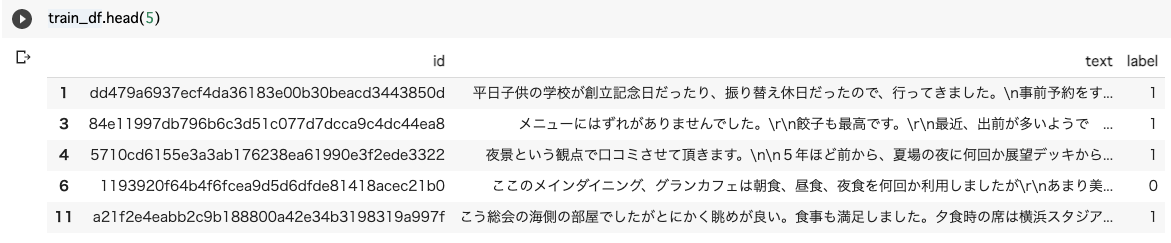
これを用いて、BERTのポジネガ分析をしてみましょう。
tokenizer
まずは、tokenizerを定義します。学習済みモデルは、 'cl-tohoku/bert-base-japanese'を使用します。
# tokenizerの定義とvocabの辞書 model_name = 'cl-tohoku/bert-base-japanese' tokenizer = BertJapaneseTokenizer.from_pretrained(model_name)
実際に分割例を見てみます。
# tokenizerの分割例 text = "カーネーションが綺麗だった" tokenizer.tokenize(text)

Input Embedding
次に入力をみていきましょう。
入力に必要なのは、Token Embedding(input_id), Segment Embedding(segment_id), attention_maskです。
Positional Embeddingは内部でやってくれるので作成する必要はありません。
# pad_tokenとmax_lengthの設定
pad = tokenizer.vocab["[PAD]"]
max_lengths=512

# tokenをid化
token = ["[CLS]"]+tokenizer.tokenize(text)[:max_lengths-2]+["[SEP]"]
input_id = tokenizer.convert_tokens_to_ids(token)

# 1文のみなのでsegment_idは全て0
segment_id = [0]*max_lengths

# input_idが存在する箇所に1を立てる
attention_mask = [1]*len(input_id)+[0]*(max_lengths - len(input_id))
input_id = input_id+[pad]*(max_lengths-len(input_id))
print("text:", text)
print("token:", token)
print("input_id:", input_id[:15], "len:", len(input_id))
print("segment_id:", segment_id[:15], "len:", len(segment_id))
print("attention_mask:", attention_mask[:15], "len:", len(attention_mask))

Data Loader作成
上記のinput Embeddingを元に、Datasetクラスを作成します。
# 上記のinput_dataの作成方法をもとにdataset化
class ReviewDataset(torch.utils.data.Dataset):
    def __init__(self, texts, labels=[]):
        self.input_ids, self.segment_ids, self.attention_masks = [],[],[]
        for text in tqdm(texts):
            token = ["[CLS]"]+tokenizer.tokenize(text)[:max_lengths-2]+["[SEP]"]
            input_id = tokenizer.convert_tokens_to_ids(token)
            segment_id = [0]*max_lengths
            attention_mask = [1]*len(input_id)+[0]*(max_lengths - len(input_id))
            input_id = input_id+[pad]*(max_lengths-len(input_id))
            self.input_ids.append(input_id)
            self.segment_ids.append(segment_id)
            self.attention_masks.append(attention_mask)

        self.input_ids = np.array(self.input_ids)
        self.segment_ids = np.array(self.segment_ids)
        self.attention_masks = np.array(self.attention_masks)
        self.labels = labels

    def __len__(self):
        return len(self.input_ids)

    def __getitem__(self, idx):
        if len(self.labels):
            return self.input_ids[idx], self.segment_ids[idx], self.attention_masks[idx], self.labels[idx]
        else:
            return self.input_ids[idx], self.segment_ids[idx], self.attention_masks[idx]
上記クラスを使って、train_dataloaderとvalid_dataloaderを作成します。
# datasetとdataloaderの作成
from sklearn.model_selection import train_test_split

batch_size=8
X,y = train_df["text"].values, train_df["label"].values
X_train, X_val, y_train, y_val = train_test_split(X, y, test_size=0.3, random_state=100,stratify=y)
train_ds = ReviewDataset(texts=X_train, labels=y_train)
train_dl = torch.utils.data.DataLoader(train_ds, batch_size=batch_size, shuffle=True)

val_ds = ReviewDataset(texts=X_val, labels=y_val)
val_dl = torch.utils.data.DataLoader(val_ds, batch_size=batch_size, shuffle=False)
modelの作成
BERTの2値分類モデルを作成します。
[CLS]トークンの特徴量を用いて全結合で2つの値を出力します。
# Bertの事前学習済みエンコーダーを使用して2値クラス分類器を作成
class BertClassification(nn.Module):
    def __init__(self, bert):
        super(BertClassification, self).__init__()
        # BERTモジュール
        self.bert = bert
        # BERTモデル
        self.cls = nn.Linear(in_features=768, out_features=2)
        # 重み初期化処理
        nn.init.normal_(self.cls.weight, std=0.02)
        nn.init.normal_(self.cls.bias, 0)

    def forward(self, input_ids, token_type_ids=None, attention_mask=None):
        # BERTの基本モデル部分の順伝搬
        output = self.bert(input_ids, token_type_ids, attention_mask)
        # [CLS]に対応する特徴量を取得します。
        pooled_output = output[1]
        # 入力文章の1単語目[CLS]の特徴量を使用して、ポジ・ネガを分類します
        pooled_output = pooled_output.view(-1, 768) # sizeを[batch_size, hidden_size]に変換
        out = self.cls(pooled_output)
        return out
「pooled_output=output[1]」の部分がわかりづらいので解説すると、 bertの公式では以下のように記述されています。
A BaseModelOutputWithPoolingAndCrossAttentions (if return_dict=True is passed or when config.return_dict=True) or a tuple of torch.FloatTensor comprising various elements depending on the configuration (BertConfig) and inputs. last_hidden_state (torch.FloatTensor of shape (batch_size, sequence_length, hidden_size)) – Sequence of hidden-states at the output of the last layer of the model. pooler_output (torch.FloatTensor of shape (batch_size, hidden_size)) – Last layer hidden-state of the first token of the sequence (classification token) further processed by a Linear layer and a Tanh activation function. The Linear layer weights are trained from the next sentence prediction (classification) objective during pretraining.
つまり、bertのoutputは以下のようになっています。
output=(last_layerの全てのtoken,last_layerの最初のToken(=[CLS]Token))
ということで、output[1]は[CLS]Tokenの特徴量を抽出していることになるわけですね。
ちなみに、attentionを可視化したいとか、最終層以外の特徴量も取り出したい等あれば、そういうオプションもあるので、以下を参考にしてください。
Optimizer等の設定
次にOptimizerや、損失関数、gpuを使用するか等の設定を行います。
今回は、AdamとCross Entropyを使用します。
cuda = torch.cuda.is_available()

# 学習済みモデルをダウンロード
bert = BertModel.from_pretrained(model_name)
model = BertClassification(bert)

# 高速化
torch.backends.cudnn.benchmark = True

if cuda:
    model.cuda()

# optimizerの設定
optimizer = optim.Adam(model.parameters(),lr = 4e-4 ,betas=(0.9, 0.999))

# 損失関数の設定
criterion = nn.CrossEntropyLoss()
また、今回は学習時間を短縮するため、最終層以外のパラメータを固定します。
実際のタスクでは、全てのパラメータを学習することも多いです。
# 最後以外のBertLayerモジュールのパラメータを固定(実際のタスクでは固定させないことも多い)
for param in model.bert.encoder.layer[:-1].parameters():
    param.requires_grad = False
学習
ここで学習フェーズです。
Pytorchは先ほど作ったdata_loaderを使って、for文でtrainingしていきます。
train, validともに1イテレーションごとに記述できるのが良いですね。
## 学習します。1epochあたり約8分です。
epochs = 2
for epoch in range(epochs):
    total_loss = 0
    accuracy = 0
    model.train()
    print("epoch {} start!".format(epoch+1))

    # train
    for iter_num, (input_ids, segment_ids, attention_masks, labels) in tqdm(enumerate(train_dl),total = len(train_dl)):
        optimizer.zero_grad()
        if cuda:
            input_ids, segment_ids, attention_masks, labels = input_ids.cuda(), segment_ids.cuda(), attention_masks.cuda(), labels.cuda()

        # forward(順伝搬)
        outputs = model(input_ids = input_ids, token_type_ids = segment_ids, attention_mask = attention_masks)
        pred_proba = outputs.softmax(dim=1)[:,1]
        pred = (pred_proba>=0.5).type(torch.int)
        loss = criterion(outputs,labels)

        # backward(逆伝搬)
        loss.backward()
        optimizer.step()
        total_loss += loss.item()
        accuracy += (pred==labels).sum().item()

        #50 iterごとにlossとaccuracyを表示
        if (iter_num+1) % 50 == 0:
            size = batch_size*(iter_num+1)
            print("{} iter loss:{:.4f} accuracy:{:.4f}".format(iter_num+1, total_loss/(iter_num+1), accuracy/size))

    total_loss /= len(train_dl)
    accuracy /= len(train_ds)

    # validation
    val_total_loss = 0
    val_accuracy = 0
    model.eval()
    for input_ids, segment_ids, attention_masks, labels in tqdm(val_dl):
        if cuda:
            input_ids, segment_ids, attention_masks, labels = input_ids.cuda(), segment_ids.cuda(), attention_masks.cuda(), labels.cuda()
        with torch.no_grad():
            outputs = model(input_ids = input_ids, token_type_ids = segment_ids, attention_mask = attention_masks)
            pred_proba = outputs.softmax(dim=1)[:,1]
            pred = (pred_proba>=0.5).type(torch.int)
            loss = criterion(outputs,labels)
            val_total_loss += loss.item()
            val_accuracy += (pred==labels).sum().item()

    val_total_loss /= len(val_dl)
    val_accuracy /= len(val_ds)
    print("epoch{} total loss:{:.4f}, accuracy:{:.4f}, val_total loss:{:.4f}, val_accuracy:{:.4f}".format(epoch+1,total_loss,accuracy,val_total_loss,val_accuracy))

torch.save(model.state_dict(), './model.hdf5')
予測
最後に、本当にできたか予測してみましょう。
まずは出来上がったモデルをロードします。
model.load_state_dict(torch.load("./model.hdf5"))
実際に予測してみます。
"今日のランチは最高だった!"を予測してみます。
X_test = ["今日のランチは最高だった!"]
test_ds = ReviewDataset(texts=X_test)
test_dl = torch.utils.data.DataLoader(test_ds, batch_size=1, shuffle=False)

for input_ids, segment_ids, attention_masks in test_dl:
    if cuda:
        input_ids, segment_ids, attention_masks = input_ids.cuda(), segment_ids.cuda(), attention_masks.cuda()
    outputs = model(input_ids = input_ids, token_type_ids = segment_ids, attention_mask = attention_masks)
    pred_proba = outputs.softmax(dim=1)[:,1]
    print("入力テキストのポジティブ度: {:.4f}".format(pred_proba.item()))

もう一つ予測してみましょう。
"今日のランチは微妙だった。"を予測してみます。
X_test = ["今日のランチは微妙だった。"]
test_ds = ReviewDataset(texts=X_test)
test_dl = torch.utils.data.DataLoader(test_ds, batch_size=1, shuffle=False)

for input_ids, segment_ids, attention_masks in test_dl:
    if cuda:
        input_ids, segment_ids, attention_masks = input_ids.cuda(), segment_ids.cuda(), attention_masks.cuda()
    outputs = model(input_ids = input_ids, token_type_ids = segment_ids, attention_mask = attention_masks)
    pred_proba = outputs.softmax(dim=1)[:,1]
    print("入力テキストのポジティブ度: {:.4f}".format(pred_proba.item()))

うまく予想できてそうですね。
まとめ
今回は実際のコードを紹介しました。
BERTはoutput layerを変えるだけでclassificationだけでなく、 さまざまなタスクが実行可能なのでぜひ試してみてください!
参考文献
- つくりながら学ぶ! PyTorchによる発展ディープラーニング 小川雄太郎 著
Comments
Loading comments...